Circuit Playground
Adafruit's round board, with an accelerometer, light, sound and temperature sensors, eight touch pads, ten NeoPixels, two buttons and a slide switch. George's firmware turns it into a MIDI controller with one sensor on duty at a time, depending on the mode. The firmware is from a 2019 Web MIDI workshop and hasn't changed since.
The firmware is public: github.com/georgemandis/circuit-playground-midi-multi-tool.
This page comes from reading that .ino. Where they disagree, the code wins.
| Maker | Adafruit, with George's firmware |
| USB name | depends on how it was flashed. "Circuit Playground Express" on the ones on the table. The Explorer prints it. |
| Ports | 1 in, 1 out |
| Sends | Channel 2. Notes for touch, random and accelerometer modes, CC 1 for light, sound and temperature. |
| Receives | Notes. Mode 8 plays them on the speaker, mode 10 mixes them into a pixel colour. |
| Buy | adafruit.com/product/3333 |
| Firmware | github.com/georgemandis/circuit-playground-midi-multi-tool |
Pick a mode first
To change or view the current mode your Circuit Playground is in, toggle the slide switch so that one or more NeoPixel LEDs light up and stay on:
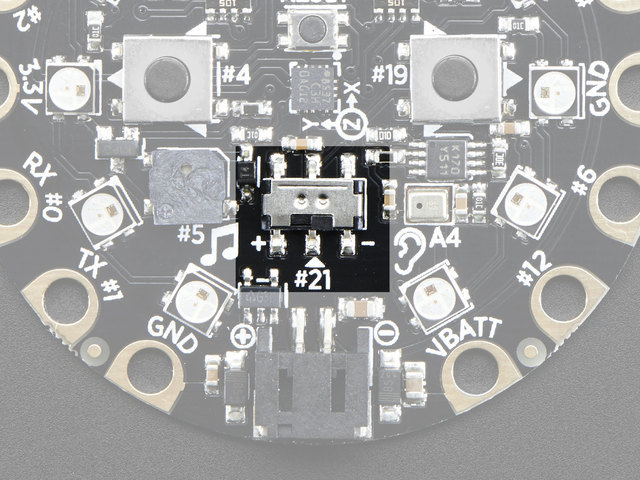
With the slide switch toggled you can change modes by pressing the left and right buttons on the board. The number of lit pixels is the mode number, one pixel for mode 1 up to all ten for mode 10, and a pitch plays on each press:
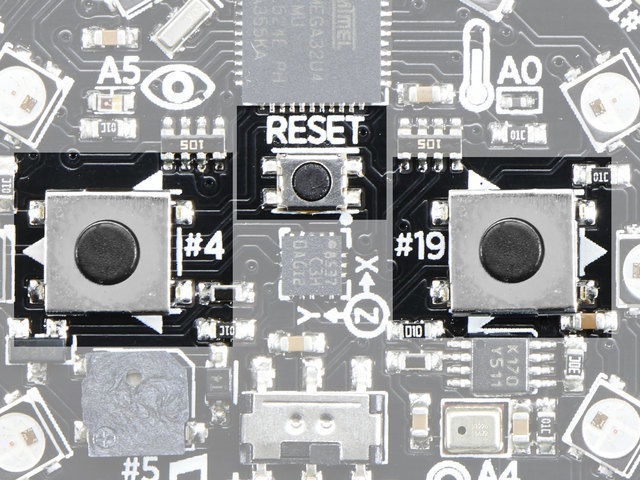
Toggle the switch back and the mode starts.
It's one mode at a time, so a sketch that wants both light and touch needs two boards. The buttons and the switch only pick the mode. They never send MIDI, so if the Explorer shows nothing when you press a button, that's expected.
The ten modes
Everything the board sends is on channel 2: status 0x91 for notes, 0xB1 for control changes.
Modes that send MIDI
| Mode | What it does |
|---|---|
| 1 | Cap touch. Each of the eight pads is a note: note on with velocity 127 when touched, note off on release. Note number is 1 + the pad's pin (table below). The pixels flash a random colour on each touch, and the buttons nudge the touch sensitivity. |
| 2 | Light. CC 1 with the light level scaled to 0..127, once a second. |
| 3 | Sound. CC 1 with the sound level scaled to 0..127, once a second. |
| 4 | Temperature. CC 1 with degrees Celsius as the value, once a second. |
| 5 | Random notes. A note on with a random note and random velocity, every 50 ms or so. The buttons speed it up and slow it down. |
| 6 | Accelerometer. Three note ons in a row every 200 ms, so five times a second: x, y, then z, each as note = m/s² + 20, velocity 127. 20 is zero g, 30 is about one g. Flat on a table reads roughly 20, 20, 30. |
| 7 | Tap. A tap on the board flashes all ten pixels a random colour and prints to the serial port. No MIDI. The firmware README says it sends a message; the code that would is commented out. See below. |
Modes that receive MIDI
| Mode | What it does |
|---|---|
| 8 | Speaker. Plays any incoming note on over the built-in speaker, at the note's pitch, for 50 ms. |
| 10 | Colour mixer. A note on on channel 1 sets red, channel 2 sets green, channel 3 sets blue, each to note + velocity (0 to 254), on all ten pixels at once. |
Neither
| Mode | What it does |
|---|---|
| 9 | Random tones on the speaker and random pixel flashes. No MIDI in or out. For funsies. |
No mode does both.
Touch pads, helper index to firmware pin to note:
touch(i) | 0 | 1 | 2 | 3 | 4 | 5 | 6 | 7 |
|---|---|---|---|---|---|---|---|---|
| pin | 3 | 2 | 0 | 1 | 12 | 6 | 9 | 10 |
| note | 4 | 3 | 1 | 2 | 13 | 7 | 10 | 11 |
About mode 7
The firmware README says mode 7 "converts the accelerometer tap detection to a MIDI message". The
helpers' README says it sends nothing. The code: setup() arms the tap detector and attaches an
interrupt. In mode 7 the interrupt prints the tap to serial, sets a flag and flashes all ten pixels. The
part of mode 7 that would send noteOn(2, 1, 127) sits under "Accelerometer detect tap: TBD" and is
commented out. So the README overstates it. A tap is felt and shown on the board and no MIDI leaves it.
A hardware check is still pending. For a buzzer or a tap, use a touch pad in mode 1.
Start here
- p5.js
- Python Mode
- Java
Click inside the sketch to connect MIDI. No device? The keys named in the code stand in.
Code: starters/p5/circuit-playground/sketch.js. Paste it into the
p5.js web editor with the helper script tag, or
download the folder and double-click index.html.
// Circuit Playground starter: the eight touch pads light a ring, tilt rolls a ball, the light sensor sets
// the sky. The firmware sends ONE sensor at a time: flip the slide switch and use the two buttons to pick a
// mode (see HARDWARE-CHECKLIST.md). Click once to connect MIDI. No board: keys 1-8 are the pads, the mouse tilts.
let cpx;

function setup() {
  createCanvas(800, 600);
  cpx = new CircuitPlayground();   // change this: new CircuitPlayground({ name: "..." }) if it isn't found
  cpx.connectOnClick();            // connects on the first click and shows a hint until then
}

function draw() {
  let tiltX = cpx.accel.x, tiltY = cpx.accel.y;     // -1..1, one g = 1 (accelerometer mode)
  if (!cpx.connected()) {                            // mouse stand-in
    tiltX = mouseX * 2 / width - 1;
    tiltY = mouseY * 2 / height - 1;
  }
  background(lerpColor(color(10, 10, 40), color(255, 230, 120), cpx.light));  // change this: light is 0..1
  translate(width / 2, height / 2);
  for (let i = 0; i < 8; i++) {                      // the eight capacitive pads, as a ring
    const a = TWO_PI * i / 8;
    fill(cpx.touch(i) ? color(255, 80, 120) : color(70, 70, 90));   // change this: a colour per pad?
    circle(cos(a) * 220, sin(a) * 220, cpx.touch(i) ? 90 : 50);
  }
  fill(255);
  circle(tiltX * 200, tiltY * 200, 60 + cpx.sound * 100);   // change this: the ball; sound is 0..1
}
Open starters/python/circuitplayground_starter/circuitplayground_starter.pyde.
# Circuit Playground starter: the eight touch pads light a ring, tilt rolls a ball,
# the light sensor sets the sky. The firmware sends ONE sensor at a time: flip the slide
# switch and use the two buttons to pick a mode (see HARDWARE-CHECKLIST.md).
# No board: keys 1-8 are the pads, the mouse tilts. Edit the lines marked "change this".
from __future__ import division, print_function
from circuitplayground import CircuitPlayground

cpx = None

def setup():
    global cpx
    size(800, 600)
    cpx = CircuitPlayground(this)   # change this: CircuitPlayground(this, "name") if it isn't found
    cpx.connect()                   # prints the MIDI devices it found; fine with no device

def draw():
    tilt_x, tilt_y = cpx.accel.x, cpx.accel.y   # -1..1, one g = 1 (accelerometer mode)
    if not cpx.connected():         # mouse stand-in
        tilt_x = mouseX * 2.0 / width - 1
        tilt_y = mouseY * 2.0 / height - 1
    background(lerpColor(color(10, 10, 40), color(255, 230, 120), cpx.light))  # change this: light is 0..1
    translate(width / 2, height / 2)
    for i in range(8):              # the eight capacitive pads, as a ring
        a = TWO_PI * i / 8
        fill(color(255, 80, 120) if cpx.touch(i) else color(70, 70, 90))   # change this: a colour per pad?
        circle(cos(a) * 220, sin(a) * 220, 90 if cpx.touch(i) else 50)
    fill(255)
    circle(tilt_x * 200, tilt_y * 200, 60 + cpx.sound * 100)    # change this: the ball; sound is 0..1

def stop(): cpx.close()      # closes the MIDI port when the sketch closes
Open starters/java/CircuitPlaygroundStarter/CircuitPlaygroundStarter.pde.
// Circuit Playground starter: the eight touch pads light a ring, tilt rolls a ball,
// the light sensor sets the sky. The firmware sends ONE sensor at a time: flip the slide
// switch and use the two buttons to pick a mode (see HARDWARE-CHECKLIST.md).
// No board: keys 1-8 are the pads, the mouse tilts. Edit the lines marked "change this".
CircuitPlayground cpx;

void setup() {
  size(800, 600);
  cpx = new CircuitPlayground(this);   // change this: new CircuitPlayground(this, "name") if it isn't found
  cpx.connect();                       // prints the MIDI devices it found; fine with no device
}

void draw() {
  float tiltX = cpx.accel.x, tiltY = cpx.accel.y;   // -1..1, one g = 1 (accelerometer mode)
  if (!cpx.connected()) {                            // mouse stand-in
    tiltX = mouseX * 2.0 / width - 1;
    tiltY = mouseY * 2.0 / height - 1;
  }
  background(lerpColor(color(10, 10, 40), color(255, 230, 120), cpx.light));  // change this: light is 0..1
  translate(width / 2, height / 2);
  for (int i = 0; i < 8; i++) {                      // the eight capacitive pads, as a ring
    float a = TWO_PI * i / 8;
    fill(cpx.touch(i) ? color(255, 80, 120) : color(70, 70, 90));   // change this: a colour per pad?
    circle(cos(a) * 220, sin(a) * 220, cpx.touch(i) ? 90 : 50);
  }
  fill(255);
  circle(tiltX * 200, tiltY * 200, 60 + cpx.sound * 100);   // change this: the ball; sound is 0..1
}
The helper
new CircuitPlayground(this) | Connects by USB-name substring. The board's USB name depends on how it was flashed. The Explorer prints it. |
cpx.touch(i), cpx.touchJustPressed(i), cpx.anyTouch() | The eight pads, index 0 to 7 as in the table above. Mode 1. |
cpx.light, cpx.sound (0 to 1), cpx.temperature (°C), cpx.sensor (raw CC 1) | All three follow the same CC 1. Which one means anything depends on the mode the board is in. |
cpx.accel.x, .y, .z | -1 to 1, one g is 1. Mode 6. |
cpx.mode | "touch", "accel", "sensor", "notes" or empty: the kind of traffic last recognised. |
cpx.pixels(r, g, b), cpx.clear() | All ten pixels one colour, for a board in mode 10. |
void touchPressed(int pad), void touchReleased(int pad), void accelChanged() | Define any in your sketch and the helper calls it. The generic noteOn and controlChange work too. |
From the helpers' README
This differs from the original API contract. The firmware at
github.com/georgemandis/circuit-playground-midi-multi-tool (main, 2026-10-02) sends one sensor at a time,
chosen by its mode, and never sends the buttons or the slide switch (they pick the mode). So there is no
buttonA, buttonB or slideSwitch, and light, sound and temperature all come from the same CC 1.
Only the mode the board is in tells them apart. The helper exposes what arrives, plus mode, the kind of
traffic it last recognised.
CircuitPlayground cpx = new CircuitPlayground(this);         // or (this, "name")
cpx.touch(i); cpx.touchJustPressed(i); cpx.touchJustReleased(i); cpx.anyTouch();   // i = 0..7 (table below)
cpx.accel.x; cpx.accel.y; cpx.accel.z;                       // -1..1, one g = 1, clamped. accel.rawX etc. are the notes
cpx.light; cpx.sound;                                        // 0..1 (CC 1 / 127; both follow CC 1)
cpx.temperature;                                             // whole degrees C (the raw CC 1 value)
cpx.sensor;                                                  // raw CC 1 value 0..127, -1 if never
cpx.mode;                                                    // "touch", "accel", "sensor", "notes" or "" (nothing yet)
cpx.pixels(r, g, b); cpx.pixel(i, r, g, b); cpx.clear();     // all ten NeoPixels, one colour (mode 10)
cpx.padForPin(pin); cpx.padForNote(note); cpx.noteForPad(i); cpx.accelFromNote(note);
Callbacks: touchPressed(int pad), touchReleased(int pad), accelChanged(). Stand-in: keys 1..8
are the touch pads.
What the firmware sends. All output is on status 0x91, channel 2 (the sketch calls noteOn(1, ...)
with a 0-based channel). Mode numbers are the firmware README's. The NeoPixel ring shows mode − 1 pixels
while the slide switch is on; left and right buttons change it.
| Mode | Sends | Helper fields |
|---|---|---|
| 1 cap touch | Note On vel 127 on touch, Note Off on release; note = 1 + pin | touch(i), callbacks |
| 2 light | CC 1 = light / 1023 · 127, once a second | light, sensor |
| 3 sound | CC 1 = sound / 1023 · 127, once a second | sound, sensor |
| 4 temperature | CC 1 = °C as an integer, once a second | temperature, sensor |
| 5 random notes | Note On, random note and velocity, every ~50 ms (buttons change the rate) | mode == "notes"; use noteOn() or AnyMidi |
| 6 accelerometer | three Note Ons in a burst every 200 ms: X, Y, Z as round(m/s² + 20), vel 127 | accel |
| 7 tap | nothing over MIDI (pixels flash locally) | - |
| 8 speaker | plays any incoming Note On | pixels() will also beep it |
| 9 random tones | nothing over MIDI | - |
| 10 colour mixer | listens: Note On on channel 1 / 2 / 3 sets red / green / blue = note + velocity (0..254), all pixels | pixels(), clear() |
Touch pads, index → firmware pin → note:
touch(i) | 0 | 1 | 2 | 3 | 4 | 5 | 6 | 7 |
|---|---|---|---|---|---|---|---|---|
| pin | 3 | 2 | 0 | 1 | 12 | 6 | 9 | 10 |
| note | 4 | 3 | 1 | 2 | 13 | 7 | 10 | 11 |
Touch and accelerometer are both Note Ons on the same channel. Three Note Ons within 60 ms count as one
accelerometer reading (touch never does that); any Note Off means touch. In accelerometer mode a note
that collides with a pad note (board on its side gives about note 10) is not reported as a touch.
pixel(i, ...) sets all ten pixels because the firmware has no per-pixel message.
Python: CircuitPlayground(this, name="circuit playground"), cpx.touch(i), cpx.touch_just_pressed(i),
cpx.accel.x, cpx.light, cpx.sound, cpx.temperature, cpx.sensor, cpx.mode, cpx.pixels(r, g, b),
cpx.clear(); callbacks touch_pressed(pad), touch_released(pad), accel_changed().
Try first
- Mode 2: a sketch whose background follows the room light. Cover the sensor with your hand.
- Mode 3: clap to spawn a shape. The value is loudness.
- Mode 6: a bouncy ball that rolls the way you tilt the board.
- Mode 1: eight touch pads, eight notes. Wire a fruit to one with a clip lead and play it.
- Mode 10: send notes at it from the Explorer's send panel and mix a colour on the pixels.
More on the ideas page.
Projects for this board
The projects from the 2019 workshop, which used these boards with Web MIDI. They are being rebuilt in
ports/ and land here as they finish.
Colour mixer, mode 10
In mode 10 a sketch mixes colours on the onboard NeoPixels by sending note on messages to channels 1, 2 and 3 for red, green and blue. The device listens for status bytes 144, 145 and 146, note ons for MIDI channels 1 to 3.
Because we're limited to two 7-bit bytes instead of a single 8-bit value there's a curious "bug" with this approach. Can you identify it? Can you fix it?
- p5.js
- Python Mode
- Java
// Colour Mixer (George's 2019 workshop project, firmware mode 10), p5.js. Three sliders mix a colour on screen and
// the board's ten NeoPixels follow in real time. Uses midi-helpers.js to connect; the colour messages are sent raw
// below so you can see the bytes. Click once to connect MIDI.
//
// Mode 10: a Note On on channel 1 sets red, channel 2 green, channel 3 blue, and the value is note + velocity.
// From 2019: "Because we're limited to two 7-bit messages instead of a single 8-bit message there's a curious 'bug'
// with this approach... Can you identify it? Can you fix it?"  A MIDI data byte is 0..127, so one byte only reaches
// half brightness. The fix splits the 0..255 value across note and velocity: 200 = 127 + 73. Even fixed, 127 + 127 =
// 254: pure white is one step out of reach, the other half of the bug. B flips bug / fix, W is white.
// Mouse: drag the sliders. Keys: B bug/fix, W white, K black. Works without a board (nothing to light).
let cpx, rgb = [200, 80, 40], fixed = true, dragging = -1;
const NAMES = ["red", "green", "blue"];

function setup() {
  createCanvas(600, 420);
  textSize(16);
  cpx = new CircuitPlayground();
  cpx.connectOnClick();
}

function send() {                                 // one Note On per colour: channel 1 red, 2 green, 3 blue
  for (let i = 0; i < 3; i++) {
    const v = rgb[i], note = min(127, v);
    if (fixed) cpx.core.noteOn(i + 1, note, v - note);   // split: note + velocity = v (max 254)
    else cpx.core.noteOn(i + 1, note, 0);                // naive: one 7-bit byte, tops out at 127
  }
}
const boardValue = (v) => (fixed ? min(254, v) : min(127, v));   // what the board actually shows

function draw() {
  background(30);
  noStroke();
  fill(rgb[0], rgb[1], rgb[2]); rect(20, 20, 270, 100, 12);
  fill(boardValue(rgb[0]), boardValue(rgb[1]), boardValue(rgb[2])); rect(310, 20, 270, 100, 12);
  fill(220);
  text(`on screen: rgb(${rgb.join(", ")})`, 20, 140);
  text(`on the board: rgb(${rgb.map(boardValue).join(", ")})   ${fixed ? "fix: note + velocity" : "BUG: one 7-bit byte"}`, 310, 140);
  for (let i = 0; i < 3; i++) {
    const y = 190 + i * 70, note = min(127, rgb[i]), vel = fixed ? rgb[i] - note : 0;
    fill(60); rect(60, y - 4, 510, 8, 4);
    fill([color(255, 80, 80), color(80, 255, 80), color(80, 120, 255)][i]);
    circle(60 + rgb[i] * 2, y, 28);
    fill(220);
    text(`${NAMES[i]} ${rgb[i]}`, 60, y - 16);
    text(`[${0x90 + i}, ${note}, ${vel}]`, 420, y - 16);        // the bytes that just went out
  }
  text("drag sliders   B bug/fix   W white   K black" + (cpx.connected() ? "" : "   (no board connected)"), 20, height - 40);
}

function mousePressed() { for (let i = 0; i < 3; i++) if (abs(mouseY - (190 + i * 70)) < 20) dragging = i; mouseDragged(); }
function mouseDragged() { if (dragging >= 0) { rgb[dragging] = constrain(floor((mouseX - 60) / 2), 0, 255); send(); } }
function mouseReleased() { dragging = -1; }
function keyPressed() {
  if (key === "b") fixed = !fixed;
  else if (key === "w") rgb = [255, 255, 255];
  else if (key === "k") rgb = [0, 0, 0];
  send();
}
# Colour Mixer (George's 2019 workshop project, firmware mode 10), Python Mode. Three sliders mix a colour on
# screen and the board's ten NeoPixels follow in real time. Needs midicore.py + circuitplayground.py to connect;
# the colour messages are sent raw below so you can see the bytes.
#
# Mode 10: a Note On on channel 1 sets red, channel 2 green, channel 3 blue, and the value is note + velocity.
# From 2019: "Because we're limited to two 7-bit messages instead of a single 8-bit message there's a curious
# 'bug' with this approach... Can you identify it? Can you fix it?"  A MIDI data byte is 0..127, so one byte only
# reaches half brightness. The fix splits the 0..255 value across note and velocity: 200 = 127 + 73. Even fixed,
# 127 + 127 = 254: pure white is one step out of reach, the other half of the bug. B flips bug / fix, W is white.
# Mouse: drag the sliders. Keys: B bug/fix, W white, K black. Works without a board (nothing to light).
from __future__ import division, print_function
from circuitplayground import CircuitPlayground

cpx = None
rgb = [200, 80, 40]
NAMES = ["red", "green", "blue"]
S = {"fixed": True, "dragging": -1}

def setup():
    global cpx
    size(600, 420); textSize(16)
    cpx = CircuitPlayground(this); cpx.connect()
    send()

def send():                                     # one Note On per colour: channel 1 red, 2 green, 3 blue
    for i in range(3):
        v = rgb[i]
        if S["fixed"]: note = min(127, v); cpx.core.note_on(i + 1, note, v - note)   # split: note + velocity = v (max 254)
        else: cpx.core.note_on(i + 1, min(127, v), 0)                                # naive: one 7-bit byte, tops out at 127

def board_value(v): return min(254, v) if S["fixed"] else min(127, v)   # what the board actually shows

def draw():
    background(30); noStroke()
    fill(rgb[0], rgb[1], rgb[2]); rect(20, 20, 270, 100, 12)
    fill(board_value(rgb[0]), board_value(rgb[1]), board_value(rgb[2])); rect(310, 20, 270, 100, 12)
    fill(220)
    text("on screen: rgb(%d, %d, %d)" % tuple(rgb), 20, 140)
    text("on the board: rgb(%d, %d, %d)   %s" % (board_value(rgb[0]), board_value(rgb[1]), board_value(rgb[2]),
         "fix: note + velocity" if S["fixed"] else "BUG: one 7-bit byte"), 310, 140)
    for i in range(3):
        y = 190 + i * 70
        fill(60); rect(60, y - 4, 510, 8, 4)
        fill([color(255, 80, 80), color(80, 255, 80), color(80, 120, 255)][i])
        circle(60 + rgb[i] * 2, y, 28)
        fill(220); text("%s %d" % (NAMES[i], rgb[i]), 60, y - 16)
        note = min(127, rgb[i]); vel = rgb[i] - note if S["fixed"] else 0
        text("[%d, %d, %d]" % (0x90 + i, note, vel), 420, y - 16)   # the bytes that just went out
    text("drag sliders   B bug/fix   W white   K black" + ("" if cpx.connected() else "   (no board connected)"), 20, height - 16)

def mousePressed():
    for i in range(3):
        if abs(mouseY - (190 + i * 70)) < 20: S["dragging"] = i
    mouseDragged()
def mouseDragged():
    if S["dragging"] >= 0: rgb[S["dragging"]] = constrain((mouseX - 60) // 2, 0, 255); send()
def mouseReleased(): S["dragging"] = -1
def keyPressed():
    if key == 'b': S["fixed"] = not S["fixed"]
    elif key == 'w': rgb[:] = [255, 255, 255]
    elif key == 'k': rgb[:] = [0, 0, 0]
    send()
// Colour Mixer (George's 2019 workshop project, firmware mode 10). Three sliders mix a colour on screen and
// the board's ten NeoPixels follow in real time. Needs MidiCore.pde + CircuitPlayground.pde for connecting;
// the colour messages themselves are sent raw below so you can see the bytes.
//
// Mode 10: a Note On on channel 1 sets red, channel 2 green, channel 3 blue, and the value is note + velocity.
// Why the sum? From 2019: "Because we're limited to two 7-bit messages instead of a single 8-bit message
// there's a curious 'bug' with this approach... Can you identify it? Can you fix it?"
// A MIDI data byte is 0..127, so one byte only reaches half brightness. The fix splits the 0..255 value across
// note and velocity: 200 = note 127 + velocity 73. Even fixed, 127 + 127 = 254, so pure white is one step out
// of reach: the other half of the bug. Press B to flip between the naive send and the fix; W is white.
// Mouse: drag the three sliders. Keys: B bug/fix, W white, K black. Works without a board (nothing to light).
CircuitPlayground cpx;
int[] rgb = { 200, 80, 40 };
String[] NAMES = { "red", "green", "blue" };
boolean fixed = true;
int dragging = -1;

void setup() {
  size(600, 420);
  textSize(16);
  cpx = new CircuitPlayground(this);
  cpx.connect();
  send();
}

void send() {                                   // one Note On per colour: channel 1 red, 2 green, 3 blue
  for (int i = 0; i < 3; i++) {
    int v = rgb[i];
    if (fixed) { int note = min(127, v); cpx.core.noteOn(i + 1, note, v - note); }   // split: note + velocity = v (max 254)
    else cpx.core.noteOn(i + 1, min(127, v), 0);                                      // naive: one 7-bit byte, tops out at 127
  }
}

int boardValue(int v) { return fixed ? min(254, v) : min(127, v); }   // what the board actually shows

void draw() {
  background(30);
  noStroke();
  fill(rgb[0], rgb[1], rgb[2]);
  rect(20, 20, 270, 100, 12);
  fill(boardValue(rgb[0]), boardValue(rgb[1]), boardValue(rgb[2]));
  rect(310, 20, 270, 100, 12);
  fill(220);
  text("on screen: rgb(" + rgb[0] + ", " + rgb[1] + ", " + rgb[2] + ")", 20, 140);
  text("on the board: rgb(" + boardValue(rgb[0]) + ", " + boardValue(rgb[1]) + ", " + boardValue(rgb[2]) + ")   " + (fixed ? "fix: note + velocity" : "BUG: one 7-bit byte"), 310, 140);
  for (int i = 0; i < 3; i++) {
    float y = 190 + i * 70;
    fill(60); rect(60, y - 4, 510, 8, 4);
    fill(i == 0 ? color(255, 80, 80) : i == 1 ? color(80, 255, 80) : color(80, 120, 255));
    circle(60 + rgb[i] * 2, y, 28);
    fill(220);
    text(NAMES[i] + " " + rgb[i], 60, y - 16);
    int note = min(127, rgb[i]), vel = fixed ? rgb[i] - note : 0;
    text("[" + (0x90 + i) + ", " + note + ", " + vel + "]", 420, y - 16);     // the bytes that just went out
  }
  text("drag sliders   B bug/fix   W white   K black" + (cpx.connected() ? "" : "   (no board connected)"), 20, height - 16);
}

void mousePressed() { for (int i = 0; i < 3; i++) if (abs(mouseY - (190 + i * 70)) < 20) dragging = i; mouseDragged(); }
void mouseDragged() { if (dragging >= 0) { rgb[dragging] = constrain((mouseX - 60) / 2, 0, 255); send(); } }
void mouseReleased() { dragging = -1; }
void keyPressed() {
  if (key == 'b') fixed = !fixed;
  else if (key == 'w') rgb = new int[] { 255, 255, 255 };
  else if (key == 'k') rgb = new int[] { 0, 0, 0 };
  send();
}
Simple synthesizer, mode 8
The sketch is the keyboard, the board's speaker is the voice. Every note on the sketch sends, the board plays.
- p5.js
- Python Mode
- Java
// Simple Synth (2019 workshop project, firmware mode 8), p5.js. An on-screen keyboard that plays the board's speaker:
// in mode 8 the board plays any Note On it receives for 50 ms. Uses midi-helpers.js to connect; click once first.
// Click the keys, or type: a s d f g h j k l are the white keys from C, w e t y u the black ones. Z / X shift
// octaves. Each beep is only 50 ms, so a held key is re-sent every 60 ms to sound continuous.
// Without a board the keys still light up; there is just nothing to hear.
const WHITE = "asdfghjkl", BLACK = "wetyu";
const WHITE_OFF = [0, 2, 4, 5, 7, 9, 11, 12, 14];   // semitones above C for the nine white keys
const BLACK_OFF = [1, 3, 6, 8, 10];                 // and the five black keys
const BLACK_POS = [0, 1, 3, 4, 5];                  // which white key each black key sits after
let cpx, base = 60, held = -1, lastSent = 0;        // base: middle C

function setup() {
  createCanvas(540, 300);
  textSize(14);
  cpx = new CircuitPlayground();
  cpx.connectOnClick();
}

function play(note) { held = note; lastSent = 0; }

function draw() {
  if (held >= 0 && millis() - lastSent >= 60) { cpx.core.noteOn(1, held, 100); lastSent = millis(); }   // re-trigger the 50 ms beep
  background(30);
  for (let i = 0; i < 9; i++) {                     // white keys
    fill(held === base + WHITE_OFF[i] ? color(255, 200, 60) : 240);
    stroke(30); rect(i * 60, 60, 60, 220);
    fill(80); text(WHITE[i], i * 60 + 25, 265);
  }
  for (let i = 0; i < 5; i++) {                     // black keys
    fill(held === base + BLACK_OFF[i] ? color(255, 200, 60) : 20);
    rect(BLACK_POS[i] * 60 + 40, 60, 40, 130);
    fill(200); text(BLACK[i], BLACK_POS[i] * 60 + 54, 180);
  }
  noStroke(); fill(220);
  text(`octave ${base / 12 - 1}   Z / X octave down / up   ${cpx.connected() ? "playing on the board" : "no board: keys light but stay silent"}${held >= 0 ? "   note " + held : ""}`, 10, 30);
}

function noteAt(x, y) {                             // which key is under the mouse
  for (let i = 0; i < 5; i++) if (y < 190 && x >= BLACK_POS[i] * 60 + 40 && x < BLACK_POS[i] * 60 + 80) return base + BLACK_OFF[i];
  return y >= 60 ? base + WHITE_OFF[constrain(floor(x / 60), 0, 8)] : -1;
}
function mousePressed() { play(noteAt(mouseX, mouseY)); }
function mouseDragged() { held = noteAt(mouseX, mouseY); }
function mouseReleased() { held = -1; }

function keyPressed() {
  const w = WHITE.indexOf(key), b = BLACK.indexOf(key);
  if (w >= 0) play(base + WHITE_OFF[w]);
  else if (b >= 0) play(base + BLACK_OFF[b]);
  else if (key === "z") base = max(24, base - 12);
  else if (key === "x") base = min(96, base + 12);
}
function keyReleased() { held = -1; }
# Simple Synth (2019 workshop project, firmware mode 8), Python Mode. An on-screen keyboard that plays the
# board's speaker: in mode 8 the board plays any Note On it receives for 50 ms. Needs midicore.py + circuitplayground.py.
# Click the keys, or type: a s d f g h j k l are the white keys from C, w e t y u the black ones. Z / X shift
# octaves. Each beep is only 50 ms, so a held key is re-sent every 60 ms to sound continuous.
# Without a board the keys still light up; there is just nothing to hear.
from __future__ import division, print_function
from circuitplayground import CircuitPlayground

cpx = None
WHITE, BLACK = "asdfghjkl", "wetyu"
WHITE_OFF = [0, 2, 4, 5, 7, 9, 11, 12, 14]   # semitones above C for the nine white keys
BLACK_OFF = [1, 3, 6, 8, 10]                 # and the five black keys
BLACK_POS = [0, 1, 3, 4, 5]                  # which white key each black key sits after
S = {"base": 60, "held": -1, "last": 0}      # base: middle C

def setup():
    global cpx
    size(540, 300); textSize(14)
    cpx = CircuitPlayground(this); cpx.connect()

def play(note): S["held"], S["last"] = note, 0

def draw():
    if S["held"] >= 0 and millis() - S["last"] >= 60:        # re-trigger the 50 ms beep
        cpx.core.note_on(1, S["held"], 100); S["last"] = millis()
    background(30)
    for i in range(9):                                        # white keys
        fill(color(255, 200, 60) if S["held"] == S["base"] + WHITE_OFF[i] else 240)
        stroke(30); rect(i * 60, 60, 60, 220)
        fill(80); text(WHITE[i], i * 60 + 25, 265)
    for i in range(5):                                        # black keys
        fill(color(255, 200, 60) if S["held"] == S["base"] + BLACK_OFF[i] else 20)
        rect(BLACK_POS[i] * 60 + 40, 60, 40, 130)
        fill(200); text(BLACK[i], BLACK_POS[i] * 60 + 54, 180)
    noStroke(); fill(220)
    text("octave %d   Z / X octave down / up   %s%s" % (S["base"] // 12 - 1,
         "playing on the board" if cpx.connected() else "no board: keys light but stay silent",
         "   note %d" % S["held"] if S["held"] >= 0 else ""), 10, 30)

def note_at(x, y):                                            # which key is under the mouse
    for i in range(5):
        if y < 190 and BLACK_POS[i] * 60 + 40 <= x < BLACK_POS[i] * 60 + 80: return S["base"] + BLACK_OFF[i]
    return S["base"] + WHITE_OFF[constrain(int(x) // 60, 0, 8)] if y >= 60 else -1

def mousePressed(): play(note_at(mouseX, mouseY))
def mouseDragged(): S["held"] = note_at(mouseX, mouseY)
def mouseReleased(): S["held"] = -1

def keyPressed():
    if key == CODED: return
    w, b = WHITE.find(key), BLACK.find(key)
    if w >= 0: play(S["base"] + WHITE_OFF[w])
    elif b >= 0: play(S["base"] + BLACK_OFF[b])
    elif key == 'z': S["base"] = max(24, S["base"] - 12)
    elif key == 'x': S["base"] = min(96, S["base"] + 12)
def keyReleased(): S["held"] = -1
// Simple Synth (2019 workshop project, firmware mode 8). An on-screen keyboard that plays the board's speaker:
// in mode 8 the board plays any Note On it receives for 50 ms. Needs MidiCore.pde + CircuitPlayground.pde.
// Click the keys, or type: a s d f g h j k l are the white keys from C, w e t y u the black ones. Z / X shift
// octaves. Because each beep is only 50 ms, a held key is re-sent every 60 ms so it sounds continuous.
// Without a board the keys still light up; there is just nothing to hear.
CircuitPlayground cpx;
final String WHITE = "asdfghjkl", BLACK = "wetyu";
final int[] WHITE_OFF = { 0, 2, 4, 5, 7, 9, 11, 12, 14 };   // semitones above C for the nine white keys
final int[] BLACK_OFF = { 1, 3, 6, 8, 10 };                 // and the five black keys
final int[] BLACK_POS = { 0, 1, 3, 4, 5 };                  // which white key each black key sits after
int base = 60, held = -1, lastSent = 0;                     // base: middle C

void setup() {
  size(540, 300);
  textSize(14);
  cpx = new CircuitPlayground(this);
  cpx.connect();
}

void play(int note) { held = note; lastSent = 0; }

void draw() {
  if (held >= 0 && millis() - lastSent >= 60) { cpx.core.noteOn(1, held, 100); lastSent = millis(); }   // re-trigger the 50 ms beep
  background(30);
  for (int i = 0; i < 9; i++) {                             // white keys
    fill(held == base + WHITE_OFF[i] ? color(255, 200, 60) : 240);
    stroke(30); rect(i * 60, 60, 60, 220);
    fill(80); text(WHITE.charAt(i) + "", i * 60 + 25, 265);
  }
  for (int i = 0; i < 5; i++) {                             // black keys
    fill(held == base + BLACK_OFF[i] ? color(255, 200, 60) : 20);
    rect(BLACK_POS[i] * 60 + 40, 60, 40, 130);
    fill(200); text(BLACK.charAt(i) + "", BLACK_POS[i] * 60 + 54, 180);
  }
  noStroke(); fill(220);
  text("octave " + (base / 12 - 1) + "   Z / X octave down / up   " + (cpx.connected() ? "playing on the board" : "no board: keys light but stay silent") + (held >= 0 ? "   note " + held : ""), 10, 30);
}

int noteAt(float x, float y) {                              // which key is under the mouse
  for (int i = 0; i < 5; i++) if (y < 190 && x >= BLACK_POS[i] * 60 + 40 && x < BLACK_POS[i] * 60 + 80) return base + BLACK_OFF[i];
  return y >= 60 ? base + WHITE_OFF[constrain((int) x / 60, 0, 8)] : -1;
}
void mousePressed() { play(noteAt(mouseX, mouseY)); }
void mouseDragged() { held = noteAt(mouseX, mouseY); }
void mouseReleased() { held = -1; }

void keyPressed() {
  int w = WHITE.indexOf(key), b = BLACK.indexOf(key);
  if (w >= 0) play(base + WHITE_OFF[w]);
  else if (b >= 0) play(base + BLACK_OFF[b]);
  else if (key == 'z') base = max(24, base - 12);
  else if (key == 'x') base = min(96, base + 12);
}
void keyReleased() { held = -1; }
Quiz buzzer, mode 1
Boards as buzzers: who buzzed first? In 2019 this used mode 7, the tap. That sends nothing over MIDI, so the buzzer is a touch pad in mode 1. Slap the pad.
- p5.js
- Python Mode
- Java
// Quiz Buzzer (2019 workshop project), p5.js. Several Circuit Playgrounds, one per team; the first to send a message
// wins, the others are locked out until R resets. Uses firmware mode 1 (touch a pad to buzz): the 2019 notes say
// mode 7 "tap", but in the firmware that send is commented out ("Accelerometer detect tap: TBD"), so mode 7 sends
// nothing. Any note on channel 2 counts, so the pads do not need to be wired to anything.
// No helper here: the helper opens one device and this needs every board, so it asks Web MIDI for every input whose
// name contains "circuit playground" and numbers them as teams. Click once to connect. No boards: keys 1-4 buzz.
const COLORS = ["#ff5d73", "#ffd166", "#06d6a0", "#4cc9f0", "#c77dff", "#ff9f1c"];
const boards = [];
let winner = -1, wonAt = 0, asked = false;

function setup() { createCanvas(800, 500); textAlign(CENTER, CENTER); }

function mousePressed() {
  if (asked) return;
  asked = true;
  navigator.requestMIDIAccess().then((access) => {
    for (const input of access.inputs.values()) {
      console.log("input:", input.name);
      if (!input.name.toLowerCase().includes("circuit playground")) continue;   // change this for other devices
      const team = boards.length;                                                // this board's team number
      input.onmidimessage = (e) => { if (e.data.length === 3 && (e.data[0] & 0xf0) === 0x90 && e.data[2] > 0) buzz(team); };   // any Note On
      boards.push(input.name);
    }
    console.log(boards.length + " board(s) connected");
  }).catch((e) => console.log("no Web MIDI here (Chrome, Edge or Opera needed):", e.message));
}

function buzz(team) {                                       // first one in wins
  if (winner >= 0) return;
  winner = team;
  wonAt = millis();
}

function draw() {
  const n = max(boards.length, 4);
  background(winner < 0 ? color(20, 24, 32) : color(COLORS[winner % COLORS.length]));
  for (let i = 0; i < n; i++) {                             // one box per team
    const w = (width - 40) / n, x = 20 + i * w, c = color(winner === i ? 255 : COLORS[i % COLORS.length]);
    c.setAlpha(winner < 0 || winner === i ? 255 : 90);
    fill(c);
    rect(x + 8, 320, w - 16, 140, 16);
    fill(winner === i ? 0 : 255); textSize(28);
    text("team " + (i + 1), x + w / 2, 390);
    textSize(12); text(i < boards.length ? "board " + (i + 1) : "key " + (i + 1), x + w / 2, 430);
  }
  fill(255); textSize(winner < 0 ? 48 : 96);
  text(winner < 0 ? (asked ? "ready... buzz in!" : "click to connect MIDI") : `team ${winner + 1}!`, width / 2, 160);
  textSize(16);
  text(winner < 0 ? `${boards.length} board(s) connected   keys 1-4 buzz too` : `locked out   R to reset   (${((millis() - wonAt) / 1000).toFixed(1)} s)`, width / 2, 260);
}

function keyPressed() {
  if (key === "r") winner = -1;
  if (key >= "1" && key <= "4") buzz(+key - 1);
}
# Quiz Buzzer (2019 workshop project), Python Mode. Several Circuit Playgrounds, one per team; the first to send a
# message wins, the others are locked out until R resets. Uses firmware mode 1 (touch a pad to buzz): the 2019
# notes say mode 7 "tap", but in the firmware that send is commented out ("Accelerometer detect tap: TBD"), so
# mode 7 sends nothing. Any note on channel 2 counts, so the pads do not need to be wired to anything.
# No helper here: the helper opens one device and this needs every board, so it opens every MIDI input whose name
# contains "circuit playground" itself (through interface reflection, as midicore.py does) and numbers them as
# teams. No boards: keys 1-4 buzz.
from __future__ import division, print_function
# Python Mode runs Jython with respectJavaAccessibility off; Java 17 then refuses the
# private-member reflection on javax.sound.midi. Turn it back on before the import.
from org.python.core import Options as _JyOptions
_JyOptions.respectJavaAccessibility = True
from javax.sound.midi import MidiSystem, MidiDevice, Transmitter, Receiver, Sequencer

boards = []
COLORS = [(255, 93, 115), (255, 209, 102), (6, 214, 160), (76, 201, 240), (199, 125, 255), (255, 159, 28)]
S = {"winner": -1, "won_at": 0}

def jcall(iface, obj, name, *args):           # call a hidden JDK object through its public interface
    for m in iface.getMethods():
        if m.getName() == name and m.getParameterCount() == len(args): return m.invoke(obj, list(args))

class Buzzer(Receiver):                       # one per board; Java calls send() on the MIDI thread
    def __init__(self, team): self.team = team
    def send(self, msg, t):
        b = msg.getMessage()
        if len(b) == 3 and b[0] & 0xF0 == 0x90 and b[2] & 0xFF > 0: buzz(self.team)   # any Note On from this board
    def close(self): pass

def setup():
    size(800, 500); textAlign(CENTER, CENTER)
    for info in MidiSystem.getMidiDeviceInfo():
        dev = MidiSystem.getMidiDevice(info)
        if jcall(MidiDevice, dev, "getMaxTransmitters") == 0 or isinstance(dev, Sequencer): continue   # inputs only
        print("input: " + info.getName())
        if "circuit playground" not in info.getName().lower(): continue              # change this for other devices
        try:
            jcall(MidiDevice, dev, "open")
            jcall(Transmitter, jcall(MidiDevice, dev, "getTransmitter"), "setReceiver", Buzzer(len(boards)))
            boards.append(info.getName())
        except Exception as e: print("could not open %s: %s" % (info.getName(), e))
    print("%d board(s) connected" % len(boards))

def buzz(team):                               # first one in wins
    if S["winner"] < 0: S["winner"], S["won_at"] = team, millis()

def draw():
    n = max(len(boards), 4); w = S["winner"]
    background(color(20, 24, 32) if w < 0 else color(*COLORS[w % len(COLORS)]))
    for i in range(n):                        # one box per team
        bw = (width - 40) / n; x = 20 + i * bw
        fill(255 if w == i else color(*COLORS[i % len(COLORS)]), 255 if w < 0 or w == i else 90)
        rect(x + 8, 320, bw - 16, 140, 16)
        fill(0 if w == i else 255); textSize(28); text("team %d" % (i + 1), x + bw / 2, 390)
        textSize(12); text("board %d" % (i + 1) if i < len(boards) else "key %d" % (i + 1), x + bw / 2, 430)
    fill(255); textSize(48 if w < 0 else 96)
    text("ready... buzz in!" if w < 0 else "team %d!" % (w + 1), width / 2, 160)
    textSize(16)
    text("%d board(s) connected   keys 1-4 buzz too" % len(boards) if w < 0 else
         "locked out   R to reset   (%.1f s)" % ((millis() - S["won_at"]) / 1000.0), width / 2, 260)

def keyPressed():
    if key == 'r': S["winner"] = -1
    if key in "1234" and key != CODED: buzz(int(key) - 1)
// Quiz Buzzer (2019 workshop project). Several Circuit Playgrounds, one per team; the first to send a message
// wins, the others are locked out until R resets. Uses firmware mode 1 (touch a pad to buzz): the 2019 notes say
// mode 7 "tap", but in the firmware the tap send is commented out ("Accelerometer detect tap: TBD"), so mode 7
// sends nothing. Any note on channel 2 counts, so the pads do not have to be wired to anything.
// No helper here: the helper opens one device, and this needs every board, so it opens every MIDI input whose
// name contains "circuit playground" itself and numbers them as teams. No boards: keys 1-4 buzz.
import javax.sound.midi.*;

ArrayList<String> boards = new ArrayList<String>();
final color[] COLORS = { #ff5d73, #ffd166, #06d6a0, #4cc9f0, #c77dff, #ff9f1c };
volatile int winner = -1;                                  // set from the MIDI thread, read in draw()
int wonAt = 0;

void setup() {
  size(800, 500);
  textAlign(CENTER, CENTER);
  for (MidiDevice.Info info : MidiSystem.getMidiDeviceInfo()) try {
    MidiDevice dev = MidiSystem.getMidiDevice(info);
    if (dev.getMaxTransmitters() == 0 || dev instanceof Sequencer) continue;      // inputs only
    println("input: " + info.getName());
    if (!info.getName().toLowerCase().contains("circuit playground")) continue;   // change this for other devices
    final int team = boards.size();                                               // this board's team number
    dev.open();
    dev.getTransmitter().setReceiver(new Receiver() {
      public void send(MidiMessage m, long t) {
        byte[] b = m.getMessage();
        if (b.length == 3 && (b[0] & 0xF0) == 0x90 && (b[2] & 0xFF) > 0) buzz(team);   // any Note On from this board
      }
      public void close() { }
    });
    boards.add(info.getName());
  } catch (MidiUnavailableException e) { println("could not open " + info.getName()); }
  println(boards.size() + " board(s) connected");
}

synchronized void buzz(int team) {                          // first one in wins; synchronized settles ties
  if (winner >= 0) return;
  winner = team;
  wonAt = millis();
}

void draw() {
  int n = max(boards.size(), 4);
  background(winner < 0 ? color(20, 24, 32) : COLORS[winner % COLORS.length]);
  for (int i = 0; i < n; i++) {                            // one box per team
    float w = (width - 40) / (float) n, x = 20 + i * w;
    fill(winner == i ? 255 : COLORS[i % COLORS.length], winner < 0 || winner == i ? 255 : 90);
    rect(x + 8, 320, w - 16, 140, 16);
    fill(winner == i ? 0 : 255); textSize(28);
    text("team " + (i + 1), x + w / 2, 390);
    textSize(12); text(i < boards.size() ? "board " + (i + 1) : "key " + (i + 1), x + w / 2, 430);
  }
  fill(255); textSize(winner < 0 ? 48 : 96);
  text(winner < 0 ? "ready... buzz in!" : "team " + (winner + 1) + "!", width / 2, 160);
  textSize(16);
  text(winner < 0 ? boards.size() + " board(s) connected   keys 1-4 buzz too" : "locked out   R to reset   (" + nf((millis() - wonAt) / 1000.0, 0, 1) + " s)", width / 2, 260);
}

void keyPressed() {
  if (key == 'r') winner = -1;
  if (key >= '1' && key <= '4') buzz(key - '1');
}
Morse code translator, mode 8 or mode 1
Two directions. Type a phrase and the board beeps it as Morse in mode 8. Or tap it on a touch pad in mode 1 and the sketch decodes the dots and dashes. A Morse table: this gist.
- p5.js
- Python Mode
- Java
// Morse Code (2019 workshop project, firmware mode 8), p5.js. Type a phrase and press Enter: the board beeps it in
// Morse through its speaker while the screen shows the phrase, the code and a blinking indicator (small white dot,
// long green dash) like the 2019 page. In mode 8 the board plays any Note On for 50 ms, so a dot is one Note On and a
// dash is Note Ons every 50 ms for three units. Uses midi-helpers.js; click once to connect.
// Keys: letters, digits and space type the phrase; Enter sends; Backspace edits. Without a board it blinks silently.
const ALPHABET = "abcdefghijklmnopqrstuvwxyz0123456789";
const CODE = [".-", "-...", "-.-.", "-..", ".", "..-.", "--.", "....", "..", ".---", "-.-", ".-..", "--", "-.", "---", ".--.", "--.-", ".-.",
  "...", "-", "..-", "...-", ".--", "-..-", "-.--", "--..", "-----", ".----", "..---", "...--", "....-", ".....", "-....", "--...", "---..", "----."];
const UNIT = 70;                                            // ms per Morse unit: dot 1, dash 3, gap 1, letter gap 3, word gap 7
let cpx, typed = "sos", phrase = "", morse = "", steps = [], startAt = -1, lastBeep = 0;   // steps: { at, len, kind } kind 0 gap, 1 dot, 2 dash

function setup() {
  createCanvas(800, 400);
  textAlign(CENTER, CENTER);
  cpx = new CircuitPlayground();
  cpx.connectOnClick();
}

function start() {                                          // translate the phrase into timed steps
  phrase = typed.toLowerCase().trim(); morse = ""; steps = [];
  let t = 0;
  for (const c of phrase) {
    if (c === " ") { t += 7; morse += "   "; continue; }
    const k = ALPHABET.indexOf(c);
    if (k < 0) continue;
    for (const s of CODE[k]) { steps.push({ at: t * UNIT, len: s === "." ? 1 : 3, kind: s === "." ? 1 : 2 }); t += (s === "." ? 1 : 3) + 1; }
    morse += CODE[k] + " ";
    t += 2;
  }
  steps.push({ at: t * UNIT, len: 1, kind: 0 });            // a final silent step so the display knows it ended
  startAt = millis();
}

function draw() {
  let kind = 0;
  if (startAt >= 0) {
    const now = millis() - startAt;
    for (const s of steps) if (now >= s.at && now < s.at + s.len * UNIT) kind = s.kind;
    if (kind > 0 && millis() - lastBeep >= 50) { cpx.core.noteOn(1, 72, 100); lastBeep = millis(); }   // keep the 50 ms beep going
    if (now > steps[steps.length - 1].at + UNIT) startAt = -1;
  }
  background(20, 24, 32);
  fill(kind === 1 ? color(255) : kind === 2 ? color(60, 255, 120) : color(70, 30, 70));   // the indicator
  circle(width / 2, 110, kind === 1 ? 40 : kind === 2 ? 130 : 70);
  fill(240); textSize(28);
  text(startAt >= 0 ? phrase : typed + "_", width / 2, 230);
  fill(150); textSize(22);
  text(startAt >= 0 ? morse : "type a phrase, press Enter", width / 2, 280);
  textSize(14);
  text((cpx.connected() ? "beeping on the board (mode 8)" : "no board: silent blink") + `   unit ${UNIT} ms`, width / 2, height - 44);
}

function keyPressed() {
  if (keyCode === ENTER || keyCode === RETURN) start();
  else if (keyCode === BACKSPACE) typed = typed.slice(0, -1);
  else if (key.length === 1 && (ALPHABET.includes(key.toLowerCase()) || key === " ")) typed += key;
  return false;                                             // keep space and backspace from scrolling the page
}
# Morse Code (2019 workshop project, firmware mode 8), Python Mode. Type a phrase and press Enter: the board beeps
# it in Morse through its speaker while the screen shows the phrase, the code and a blinking indicator (small white
# dot, long green dash) like the 2019 page. In mode 8 the board plays any Note On for 50 ms, so a dot is one Note On
# and a dash is Note Ons every 50 ms for three units. Needs midicore.py + circuitplayground.py.
# Keys: letters, digits and space type the phrase; Enter sends; Backspace edits. Without a board it blinks silently.
from __future__ import division, print_function
from circuitplayground import CircuitPlayground

cpx = None
ALPHABET = "abcdefghijklmnopqrstuvwxyz0123456789"
CODE = [".-", "-...", "-.-.", "-..", ".", "..-.", "--.", "....", "..", ".---", "-.-", ".-..", "--", "-.", "---", ".--.", "--.-", ".-.",
        "...", "-", "..-", "...-", ".--", "-..-", "-.--", "--..", "-----", ".----", "..---", "...--", "....-", ".....", "-....", "--...", "---..", "----."]
UNIT = 70                                     # ms per Morse unit: dot 1, dash 3, gap 1, letter gap 3, word gap 7
S = {"typed": "sos", "phrase": "", "morse": "", "start": -1, "beep": 0}
steps = []                                    # (start ms, length in units, kind) kind 0 gap, 1 dot, 2 dash

def setup():
    global cpx
    size(800, 400); textAlign(CENTER, CENTER)
    cpx = CircuitPlayground(this); cpx.connect()

def start():                                  # translate the phrase into timed steps
    S["phrase"], S["morse"] = S["typed"].lower().strip(), ""
    del steps[:]
    t = 0
    for c in S["phrase"]:
        if c == " ": t += 7; S["morse"] += "   "; continue
        k = ALPHABET.find(c)
        if k < 0: continue
        for s in CODE[k]:
            steps.append((t * UNIT, 1 if s == "." else 3, 1 if s == "." else 2))
            t += (1 if s == "." else 3) + 1
        S["morse"] += CODE[k] + " "
        t += 2
    steps.append((t * UNIT, 1, 0))            # a final silent step so the display knows it ended
    S["start"] = millis()

def draw():
    kind = 0
    if S["start"] >= 0:
        now = millis() - S["start"]
        for st in steps:
            if st[0] <= now < st[0] + st[1] * UNIT: kind = st[2]
        if kind > 0 and millis() - S["beep"] >= 50: cpx.core.note_on(1, 72, 100); S["beep"] = millis()   # keep the beep going
        if now > steps[-1][0] + UNIT: S["start"] = -1
    background(20, 24, 32)
    fill(color(255) if kind == 1 else color(60, 255, 120) if kind == 2 else color(70, 30, 70))   # the indicator
    circle(width / 2, 110, 40 if kind == 1 else 130 if kind == 2 else 70)
    fill(240); textSize(28)
    text(S["phrase"] if S["start"] >= 0 else S["typed"] + "_", width / 2, 230)
    fill(150); textSize(22)
    text(S["morse"] if S["start"] >= 0 else "type a phrase, press Enter", width / 2, 280)
    textSize(14)
    text(("beeping on the board (mode 8)" if cpx.connected() else "no board: silent blink") + "   unit %d ms" % UNIT, width / 2, height - 24)

def keyPressed():
    if key == ENTER or key == RETURN: start()
    elif key == BACKSPACE: S["typed"] = S["typed"][:-1]
    elif key != CODED and (str(key).lower() in ALPHABET or key == " "): S["typed"] += str(key)
// Morse Code (2019 workshop project, firmware mode 8). Type a phrase and press Enter: the board beeps it in Morse
// through its speaker, while the screen shows the phrase, the code, and a blinking indicator (small white dot,
// long green dash) like the 2019 page. In mode 8 the board plays any Note On for 50 ms, so a dot is one Note On
// and a dash is Note Ons every 50 ms for three units. Needs MidiCore.pde + CircuitPlayground.pde.
// Keys: letters, digits and space type the phrase; Enter sends; Backspace edits; Escape is Processing's quit.
// Without a board the indicator still blinks, silently.
CircuitPlayground cpx;
final String ALPHABET = "abcdefghijklmnopqrstuvwxyz0123456789";
final String[] CODE = { ".-", "-...", "-.-.", "-..", ".", "..-.", "--.", "....", "..", ".---", "-.-", ".-..", "--", "-.", "---", ".--.",
  "--.-", ".-.", "...", "-", "..-", "...-", ".--", "-..-", "-.--", "--..", "-----", ".----", "..---", "...--", "....-", ".....", "-....", "--...", "---..", "----." };
final int UNIT = 70;                                        // ms per Morse unit: dot 1, dash 3, gap 1, letter gap 3, word gap 7
String typed = "sos", phrase = "", morse = "";
ArrayList<int[]> steps = new ArrayList<int[]>();           // { start ms, length in units, kind } kind 0 gap, 1 dot, 2 dash, 3 letter end
int startAt = -1, lastBeep = 0, current = -1;

void setup() {
  size(800, 400);
  textAlign(CENTER, CENTER);
  cpx = new CircuitPlayground(this);
  cpx.connect();
}

void start() {                                              // translate the phrase into timed steps
  phrase = typed.toLowerCase().trim();
  morse = "";
  steps.clear();
  int t = 0;
  for (int i = 0; i < phrase.length(); i++) {
    char c = phrase.charAt(i);
    if (c == ' ') { t += 7; morse += "   "; continue; }
    int k = ALPHABET.indexOf(c);
    if (k < 0) continue;
    for (char s : CODE[k].toCharArray()) {
      steps.add(new int[] { t * UNIT, s == '.' ? 1 : 3, s == '.' ? 1 : 2 });
      t += (s == '.' ? 1 : 3) + 1;
    }
    morse += CODE[k] + " ";
    t += 2;
  }
  steps.add(new int[] { t * UNIT, 1, 0 });                 // a final silent step so the display knows it ended
  startAt = millis();
}

void draw() {
  int kind = 0;
  if (startAt >= 0) {
    int now = millis() - startAt;
    current = -1;
    for (int i = 0; i < steps.size(); i++) if (now >= steps.get(i)[0] && now < steps.get(i)[0] + steps.get(i)[1] * UNIT) { current = i; kind = steps.get(i)[2]; }
    if (kind > 0 && millis() - lastBeep >= 50) { cpx.core.noteOn(1, 72, 100); lastBeep = millis(); }   // keep the 50 ms beep going
    if (now > steps.get(steps.size() - 1)[0] + UNIT) startAt = -1;
  }
  background(20, 24, 32);
  fill(kind == 1 ? color(255) : kind == 2 ? color(60, 255, 120) : color(70, 30, 70));   // the indicator
  circle(width / 2, 110, kind == 1 ? 40 : kind == 2 ? 130 : 70);
  fill(240); textSize(28);
  text(startAt >= 0 ? phrase : typed + "_", width / 2, 230);
  fill(150); textSize(22);
  text(startAt >= 0 ? morse : "type a phrase, press Enter", width / 2, 280);
  textSize(14);
  text((cpx.connected() ? "beeping on the board (mode 8)" : "no board: silent blink") + "   unit " + UNIT + " ms", width / 2, height - 24);
}

void keyPressed() {
  if (key == ENTER || key == RETURN) start();
  else if (key == BACKSPACE) typed = typed.length() > 0 ? typed.substring(0, typed.length() - 1) : "";
  else if (key != CODED && (ALPHABET.indexOf(Character.toLowerCase(key)) >= 0 || key == ' ')) typed += key;
}
Fruit piano, mode 1
Mode 1, alligator clips and fruit (or anything conductive). Each pad is a note. The sketch plays it or draws it.
- p5.js
- Python Mode
- Java
// Fruit Piano (2019 workshop project, firmware mode 1) and its Tactile Flashcards variant, p5.js. Alligator clips run
// from the board's eight touch pads to fruit; touching a fruit plays a tone (Web Audio) and splashes a colour.
// F makes every pad a word instead (flashcards), L cycles the language. Uses midi-helpers.js; click once to connect
// (the same click unlocks the browser's audio). No board: keys 1-8 are the pads.
const NOTES = [60, 62, 64, 65, 67, 69, 71, 72];    // C major scale, one note per pad
const WORDS = [["Apple", "Pomme", "Manzana"], ["Lime", "Citron vert", "Lima"], ["Lemon", "Citron", "Limón"], ["Orange", "Orange", "Naranja"],
  ["Pear", "Poire", "Pera"], ["Banana", "Banane", "Plátano"], ["Grape", "Raisin", "Uva"], ["Tomato", "Tomate", "Tomate"]];
const LANGS = ["English", "Français", "Español"];
const splash = new Array(8).fill(0), voices = {};
let cpx, audio = null, lang = 0, lastPad = -1, flashcards = false;

function setup() {
  createCanvas(800, 500);
  colorMode(HSB, 360, 100, 100, 100);
  textAlign(CENTER, CENTER);
  cpx = new CircuitPlayground();
  cpx.connectOnClick();
}

function touchPressed(pad) {                        // the helper calls these (keys 1-8 too, with no board)
  splash[pad] = 1;
  lastPad = pad;
  tone(NOTES[pad], true);
}
function touchReleased(pad) { tone(NOTES[pad], false); }

function tone(note, on) {                           // one oscillator per note, started and stopped like a key
  if (!audio) return;
  if (on && !voices[note]) {
    const o = audio.createOscillator(), g = audio.createGain();
    o.frequency.value = 440 * Math.pow(2, (note - 69) / 12); o.type = "triangle";
    g.gain.value = 0.2; o.connect(g).connect(audio.destination); o.start();
    voices[note] = { o, g };
  } else if (!on && voices[note]) {
    const { o, g } = voices[note]; delete voices[note];
    g.gain.setTargetAtTime(0, audio.currentTime, 0.05); o.stop(audio.currentTime + 0.3);
  }
}

function draw() {
  background(0, 0, 12);
  for (let i = 0; i < 8; i++) {                     // one circle per pad, pads 0..7 going round the board
    const x = 100 + i * 85, hue = i * 45, on = cpx.touch(i);
    if (splash[i] > 0) { fill(hue, 70, 100, splash[i] * 60); circle(x, 250, 80 + (1 - splash[i]) * 300); splash[i] -= 0.02; }
    fill(hue, 80, on ? 100 : 45);
    circle(x, 250, on ? 110 : 70);
    fill(0, 0, 100); textSize(16);
    text(flashcards ? WORDS[i][lang] : "pad " + (i + 1), x, 250);
  }
  if (flashcards && lastPad >= 0) { textSize(72); fill(lastPad * 45, 70, 100); text(WORDS[lastPad][lang], width / 2, 90); }
  fill(0, 0, 70); textSize(14);
  text((flashcards ? `flashcards: ${LANGS[lang]}   L next language` : "fruit piano") + "   F toggle   " + (cpx.connected() ? "touch the fruit" : "no board: keys 1-8"), width / 2, height - 44);
}

function mousePressed() { if (!audio) audio = new (window.AudioContext || window.webkitAudioContext)(); if (audio.state === "suspended") audio.resume(); }
function keyPressed() {
  mousePressed();                                   // a key press is a gesture too: unlock audio
  if (key === "f") flashcards = !flashcards;
  if (key === "l") lang = (lang + 1) % LANGS.length;
}
# -*- coding: utf-8 -*-
# Fruit Piano (2019 workshop project, firmware mode 1) and its Tactile Flashcards variant, Python Mode. Alligator
# clips run from the board's eight touch pads to fruit; touching a fruit plays a tone on the computer and
# splashes a colour. F makes every pad a word instead (flashcards), L cycles the language.
# Needs midicore.py + circuitplayground.py. No board: keys 1-8 are the pads.
# Sound: Java's built-in synthesizer (Gervill), reached through interface reflection because the JDK hides its
# MIDI classes from Jython (the same trick midicore.py uses). Nothing to install.
from __future__ import division, print_function
from circuitplayground import CircuitPlayground
# Python Mode runs Jython with respectJavaAccessibility off; Java 17 then refuses the
# private-member reflection on javax.sound.midi. Turn it back on before the import.
from org.python.core import Options as _JyOptions
_JyOptions.respectJavaAccessibility = True
from javax.sound.midi import MidiSystem, MidiDevice, Receiver, ShortMessage
from java.lang import Long

cpx = None
NOTES = [60, 62, 64, 65, 67, 69, 71, 72]     # C major scale, one note per pad
WORDS = [("Apple", "Pomme", "Manzana"), ("Lime", "Citron vert", "Lima"), ("Lemon", "Citron", u"Limón"), ("Orange", "Orange", "Naranja"),
         ("Pear", "Poire", "Pera"), ("Banana", "Banane", u"Plátano"), ("Grape", "Raisin", "Uva"), ("Tomato", "Tomate", "Tomate")]
LANGS = ["English", u"Français", u"Español"]
splash = [0.0] * 8
S = {"lang": 0, "last": -1, "flashcards": False, "synth": None}

def jcall(iface, obj, name, *args):           # call a hidden JDK object through its public interface
    for m in iface.getMethods():
        if m.getName() == name and m.getParameterCount() == len(args): return m.invoke(obj, list(args))

def setup():
    global cpx
    size(800, 500); colorMode(HSB, 360, 100, 100, 100); textAlign(CENTER, CENTER)
    cpx = CircuitPlayground(this); cpx.connect()
    try:
        synth = MidiSystem.getSynthesizer(); jcall(MidiDevice, synth, "open")
        S["synth"] = jcall(MidiDevice, synth, "getReceiver")
    except Exception as e: print("no built-in synth: %s" % e)

def touch_pressed(pad):                       # the helper calls these (keys 1-8 too, with no board)
    splash[pad] = 1.0; S["last"] = pad; tone(NOTES[pad], True)
def touch_released(pad): tone(NOTES[pad], False)

def tone(note, on):
    if S["synth"] is not None:
        jcall(Receiver, S["synth"], "send", ShortMessage(ShortMessage.NOTE_ON if on else ShortMessage.NOTE_OFF, 0, note, 100), Long(-1))

def draw():
    background(0, 0, 12)
    for i in range(8):                        # one circle per pad, pads 0..7 going round the board
        x, hue = 100 + i * 85, i * 45
        on = cpx.touch(i)
        if splash[i] > 0:
            fill(hue, 70, 100, splash[i] * 60); circle(x, 250, 80 + (1 - splash[i]) * 300); splash[i] -= 0.02
        fill(hue, 80, 100 if on else 45); circle(x, 250, 110 if on else 70)
        fill(0, 0, 100); textSize(16); text(WORDS[i][S["lang"]] if S["flashcards"] else "pad %d" % (i + 1), x, 250)
    if S["flashcards"] and S["last"] >= 0:
        textSize(72); fill(S["last"] * 45, 70, 100); text(WORDS[S["last"]][S["lang"]], width / 2, 90)
    fill(0, 0, 70); textSize(14)
    text(("flashcards: %s   L next language" % LANGS[S["lang"]] if S["flashcards"] else "fruit piano") + "   F toggle   " +
         ("touch the fruit" if cpx.connected() else "no board: keys 1-8"), width / 2, height - 24)

def keyPressed():
    if key == 'f': S["flashcards"] = not S["flashcards"]
    if key == 'l': S["lang"] = (S["lang"] + 1) % len(LANGS)
// Fruit Piano (2019 workshop project, firmware mode 1), and its Tactile Flashcards variant. Alligator clips run
// from the board's eight touch pads to fruit (or anything conductive); touching a fruit plays a tone on the
// computer and splashes a colour. Press F and every pad becomes a word instead: the flashcard mode, with L
// cycling the language. Needs MidiCore.pde + CircuitPlayground.pde. No board: keys 1-8 are the pads.
// Sound comes from Java's built-in synthesizer, so there is nothing to install.
import javax.sound.midi.*;

CircuitPlayground cpx;
Receiver synth;
final int[] NOTES = { 60, 62, 64, 65, 67, 69, 71, 72 };    // C major scale, one note per pad
final String[][] WORDS = { { "Apple", "Pomme", "Manzana" }, { "Lime", "Citron vert", "Lima" }, { "Lemon", "Citron", "Limón" },
  { "Orange", "Orange", "Naranja" }, { "Pear", "Poire", "Pera" }, { "Banana", "Banane", "Plátano" }, { "Grape", "Raisin", "Uva" }, { "Tomato", "Tomate", "Tomate" } };
final String[] LANGS = { "English", "Français", "Español" };
float[] splash = new float[8];
int lang = 0, lastPad = -1;
boolean flashcards = false;

void setup() {
  size(800, 500);
  colorMode(HSB, 360, 100, 100, 100);
  textAlign(CENTER, CENTER);
  cpx = new CircuitPlayground(this);
  cpx.connect();
  try { Synthesizer s = MidiSystem.getSynthesizer(); s.open(); synth = s.getReceiver(); }
  catch (MidiUnavailableException e) { println("no built-in synth: " + e.getMessage()); }
}

void touchPressed(int pad) {                                // the helper calls these (keys 1-8 too, with no board)
  splash[pad] = 1;
  lastPad = pad;
  tone(NOTES[pad], true);
}
void touchReleased(int pad) { tone(NOTES[pad], false); }

void tone(int note, boolean on) {
  if (synth == null) return;
  try { synth.send(new ShortMessage(on ? ShortMessage.NOTE_ON : ShortMessage.NOTE_OFF, 0, note, 100), -1); } catch (InvalidMidiDataException e) { }
}

void draw() {
  background(0, 0, 12);
  for (int i = 0; i < 8; i++) {                             // one circle per pad, pads 0..7 going round the board
    float x = 100 + i * 85, hue = i * 45;
    boolean on = cpx.touch(i);
    if (splash[i] > 0) { fill(hue, 70, 100, splash[i] * 60); circle(x, 250, 80 + (1 - splash[i]) * 300); splash[i] -= 0.02; }
    fill(hue, 80, on ? 100 : 45);
    circle(x, 250, on ? 110 : 70);
    fill(0, 0, 100); textSize(16);
    text(flashcards ? WORDS[i][lang] : "pad " + (i + 1), x, 250);
  }
  if (flashcards && lastPad >= 0) { textSize(72); fill(lastPad * 45, 70, 100); text(WORDS[lastPad][lang], width / 2, 90); }
  fill(0, 0, 70); textSize(14);
  text((flashcards ? "flashcards: " + LANGS[lang] + "   L next language" : "fruit piano") + "   F toggle   " + (cpx.connected() ? "touch the fruit" : "no board: keys 1-8"), width / 2, height - 24);
}

void keyPressed() {
  if (key == 'f') flashcards = !flashcards;
  if (key == 'l') lang = (lang + 1) % LANGS.length;
}
Thermometer, mode 4
Mode 4 sends degrees Celsius once a second. A very local weather app. An hour of readings is a graph.
- p5.js
- Python Mode
- Java
// Thermometer (2019 workshop project, firmware mode 4), p5.js. The board sends whole degrees Celsius once a second
// as CC 1 on channel 2; the helper exposes it as cpx.temperature. A big live reading and a 60-second history graph.
// Uses midi-helpers.js; click once to connect. Keys: F toggles Celsius / Fahrenheit. No board: up / down arrows
// move a fake temperature so the graph works.
const history = new Array(60).fill(0);              // one reading per second, newest last
let cpx, samples = 0, lastSample = 0, fake = 22, fahrenheit = false;

function setup() {
  createCanvas(800, 500);
  textAlign(CENTER, CENTER);
  cpx = new CircuitPlayground();
  cpx.connectOnClick();
}

const reading = () => (cpx.connected() ? cpx.temperature : fake);
const shown = (c) => (fahrenheit ? c * 9 / 5 + 32 : c);
const waiting = () => cpx.connected() && cpx.sensor < 0;   // connected, but no CC 1 yet (wrong mode?)

function draw() {
  if (millis() - lastSample >= 1000 && !waiting()) {        // once a second, push a sample
    lastSample = millis();
    history.shift(); history.push(reading());
    samples = min(60, samples + 1);
  }
  background(20, 24, 32);
  fill(240); textSize(120);
  text(waiting() ? "..." : shown(reading()).toFixed(1) + (fahrenheit ? " °F" : " °C"), width / 2, 120);
  textSize(14); fill(150);
  text(waiting() ? "board connected, waiting for a reading: is it in mode 4?" : cpx.connected() ? "live from the board, one reading a second" : "no board: up / down arrows fake a temperature", width / 2, 210);
  const recent = history.slice(60 - samples);               // graph of the last minute, auto-scaled
  let lo = recent.length ? min(recent) : 0, hi = recent.length ? max(recent) : 1;
  if (hi - lo < 2) { lo -= 1; hi += 1; }
  stroke(60); line(60, 260, 60, 460); line(60, 460, 760, 460);
  noFill(); stroke(255, 160, 60); strokeWeight(3);
  beginShape();
  for (let i = 60 - samples; i < 60; i++) vertex(map(i, 0, 59, 60, 760), map(history[i], lo, hi, 450, 270));
  endShape();
  strokeWeight(1); noStroke(); fill(150); textAlign(RIGHT, CENTER);
  if (recent.length) { text(shown(hi).toFixed(1), 55, 270); text(shown(lo).toFixed(1), 55, 450); }
  textAlign(CENTER, CENTER);
  text("last 60 seconds   F: " + (fahrenheit ? "show Celsius" : "show Fahrenheit"), width / 2, 480);
}

function keyPressed() {
  if (key === "f") fahrenheit = !fahrenheit;
  if (keyCode === UP_ARROW) fake += 0.5;
  if (keyCode === DOWN_ARROW) fake -= 0.5;
}
# -*- coding: utf-8 -*-
# Thermometer (2019 workshop project, firmware mode 4), Python Mode. The board sends whole degrees Celsius once a
# second as CC 1 on channel 2; the helper exposes it as cpx.temperature. A big live reading and a 60-second
# history graph. Needs midicore.py + circuitplayground.py.
# Keys: F toggles Celsius / Fahrenheit. No board: up / down arrows move a fake temperature so the graph works.
from __future__ import division, print_function
from circuitplayground import CircuitPlayground

cpx = None
history = [0.0] * 60                          # one reading per second, newest last
S = {"samples": 0, "last": 0, "fake": 22.0, "f": False}

def setup():
    global cpx
    size(800, 500); textAlign(CENTER, CENTER)
    cpx = CircuitPlayground(this); cpx.connect()

def reading(): return cpx.temperature if cpx.connected() else S["fake"]
def shown(c): return c * 9 / 5 + 32 if S["f"] else c
def waiting(): return cpx.connected() and cpx.sensor < 0   # connected, but no CC 1 yet (wrong mode?)

def draw():
    if millis() - S["last"] >= 1000 and not waiting():     # once a second, push a sample
        S["last"] = millis()
        history.pop(0); history.append(reading())
        S["samples"] = min(60, S["samples"] + 1)
    background(20, 24, 32)
    fill(240); textSize(120)
    text("..." if waiting() else "%.1f %s" % (shown(reading()), u"°F" if S["f"] else u"°C"), width / 2, 120)
    textSize(14); fill(150)
    text("board connected, waiting for a reading: is it in mode 4?" if waiting() else
         "live from the board, one reading a second" if cpx.connected() else "no board: up / down arrows fake a temperature", width / 2, 210)
    recent = history[60 - S["samples"]:]                   # graph of the last minute, auto-scaled
    lo, hi = (min(recent), max(recent)) if recent else (0, 1)
    if hi - lo < 2: lo, hi = lo - 1, hi + 1
    stroke(60); line(60, 260, 60, 460); line(60, 460, 760, 460)
    noFill(); stroke(255, 160, 60); strokeWeight(3)
    beginShape()
    for i in range(60 - S["samples"], 60): vertex(map(i, 0, 59, 60, 760), map(history[i], lo, hi, 450, 270))
    endShape()
    strokeWeight(1); noStroke(); fill(150); textAlign(RIGHT, CENTER)
    if recent: text("%.1f" % shown(hi), 55, 270); text("%.1f" % shown(lo), 55, 450)
    textAlign(CENTER, CENTER)
    text("last 60 seconds   F: " + ("show Celsius" if S["f"] else "show Fahrenheit"), width / 2, 480)

def keyPressed():
    if key == 'f': S["f"] = not S["f"]
    if key == CODED and keyCode == UP: S["fake"] += 0.5
    if key == CODED and keyCode == DOWN: S["fake"] -= 0.5
// Thermometer (2019 workshop project, firmware mode 4). The board sends its temperature in whole degrees
// Celsius once a second as CC 1 on channel 2; the helper exposes it as cpx.temperature. A big live reading
// and a 60-second history graph. Needs MidiCore.pde + CircuitPlayground.pde.
// Keys: F toggles Celsius / Fahrenheit. No board: up / down arrows move a fake temperature so the graph works.
CircuitPlayground cpx;
float[] history = new float[60];                           // one reading per second, newest last
int samples = 0, lastSample = 0;
float fake = 22;
boolean fahrenheit = false;

void setup() {
  size(800, 500);
  textAlign(CENTER, CENTER);
  cpx = new CircuitPlayground(this);
  cpx.connect();
}

float reading() { return cpx.connected() ? cpx.temperature : fake; }
float shown(float c) { return fahrenheit ? c * 9 / 5 + 32 : c; }
boolean waiting() { return cpx.connected() && cpx.sensor < 0; }   // connected, but no CC 1 yet (wrong mode?)

void draw() {
  if (millis() - lastSample >= 1000 && !waiting()) {        // once a second, push a sample
    lastSample = millis();
    for (int i = 1; i < 60; i++) history[i - 1] = history[i];
    history[59] = reading();
    samples = min(60, samples + 1);
  }
  background(20, 24, 32);
  fill(240); textSize(120);
  text(waiting() ? "..." : nf(shown(reading()), 0, 1) + (fahrenheit ? " °F" : " °C"), width / 2, 120);
  textSize(14); fill(150);
  text(waiting() ? "board connected, waiting for a reading: is it in mode 4?" : cpx.connected() ? "live from the board, one reading a second" : "no board: up / down arrows fake a temperature", width / 2, 210);
  float lo = 1e9, hi = -1e9;                                // graph of the last minute, auto-scaled
  for (int i = 60 - samples; i < 60; i++) { lo = min(lo, history[i]); hi = max(hi, history[i]); }
  if (hi - lo < 2) { lo -= 1; hi += 1; }
  stroke(60); line(60, 260, 60, 460); line(60, 460, 760, 460);
  noFill(); stroke(255, 160, 60); strokeWeight(3);
  beginShape();
  for (int i = 60 - samples; i < 60; i++) vertex(map(i, 0, 59, 60, 760), map(history[i], lo, hi, 450, 270));
  endShape();
  strokeWeight(1); noStroke(); fill(150); textAlign(RIGHT, CENTER);
  if (samples > 0) { text(nf(shown(hi), 0, 1), 55, 270); text(nf(shown(lo), 0, 1), 55, 450); }
  textAlign(CENTER, CENTER);
  text("last 60 seconds   F: " + (fahrenheit ? "show Celsius" : "show Fahrenheit"), width / 2, 480);
}

void keyPressed() {
  if (key == 'f') fahrenheit = !fahrenheit;
  if (key == CODED && keyCode == UP) fake += 0.5;
  if (key == CODED && keyCode == DOWN) fake -= 0.5;
}
Tactile flashcards, mode 1
Same wiring as the fruit piano, different payoff. Instead of a note, touching an object shows you its name, and a key cycles the language. It lives inside the fruit piano sketch above: run it, press F, and every pad becomes a word. L switches language. The word list is at the top of the sketch, so swap in whatever is on the table.
Without the helper
Channel 2 notes and CC 1 decoded inline, including the accelerometer burst. Under sixty lines, same stand-ins. Read the three bytes, no helpers first.
- Java mode:
starters/raw/java/RawCircuitPlayground/ - Python Mode:
starters/raw/python/raw_circuitplayground/ - p5.js:
starters/raw/p5/circuit-playground/, or its sketch.js